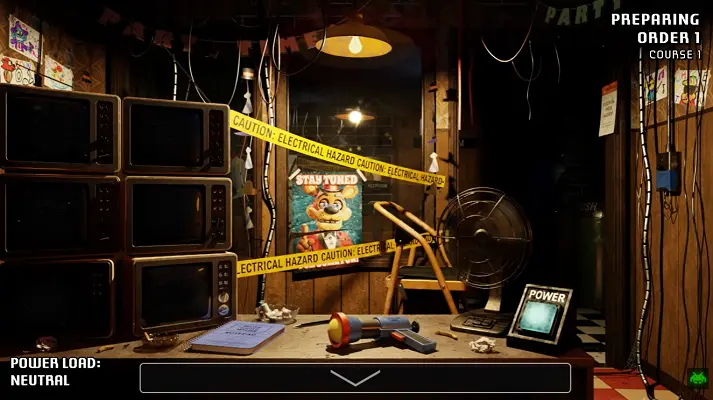
A Bite at Freddy's
Launching A Bite at Freddy's
Preparing the browser build...
A Bite at Freddy's















Play A Bite at Freddy’s online
A Bite at Freddy’s is a fan-made point-and-click horror game that treats the night shift like a kitchen disaster with teeth. You are not only watching doors and cameras. You are trying to keep Freddy Fazbear’s Grill moving while the restaurant’s delivery system sends meals toward party rooms and animatronics look for any route into the office.
The player above lets you start A Bite at Freddy’s in your browser. Click Play, give the embedded build a moment to initialize, then use full screen if the office controls or camera map feel cramped. The game rewards quick reactions, but it also punishes panic, so the best first run is careful rather than frantic.
What A Bite at Freddy’s is about
A Bite at Freddy’s follows Edward Bratch, a mechanic who answers a repair job at Freddy Fazbear’s Grill. The task sounds simple: look after the Freddy Fast-Food Delivery machine and keep orders flowing through the restaurant. Once the shift starts, that routine becomes a survival puzzle. The Manager keeps preparing courses, the Party Rooms need food, and the Talkshow Animatronics begin treating the building like a shortcut map.
Unlike a standard wait-for-the-clock horror setup, the shift pushes you through tasks. Orders need confirmation, meals need to be sent, and unfinished work can keep the night alive longer than you want. That makes every interruption dangerous. If you spend too long watching one hallway, the delivery line can fall behind. If you ignore a sound near the conveyor, something may already be close enough to punish you.
The game was created by Garrett McKay as a Five Nights at Freddy’s fan game. That context matters because A Bite at Freddy’s borrows the anxiety of camera watching but changes the rhythm. It feels less like waiting for 6 AM and more like running a haunted restaurant station where every tool has a downside.
How to play
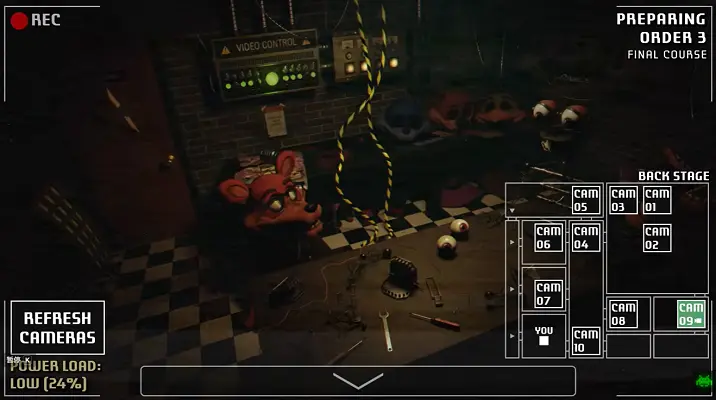
In A Bite at Freddy’s, most of the work happens through quick mouse decisions. Check camera feeds, watch the delivery route, listen for movement, and use the correct office tool before a threat reaches you. Some moments ask you to stop the conveyor. Others ask for lights, fans, camera refreshes, or a direct reaction at the desk.
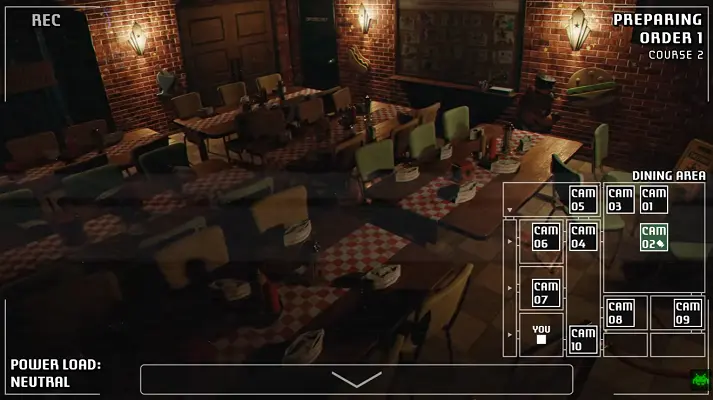
The most important system is Power Load. This fan game does not lean on the usual draining battery idea. Instead, defensive actions add stress to the building’s power. Close too much, block too much, or react too early and the load climbs toward a shutdown. Once the power load gets out of control, your options disappear at the worst possible time.
That creates the main strategy: answer only the danger that is real. The game wants you to identify routes, not mash every button because the screen is tense. A sound from the delivery entrance, a body near a vent, a figure in the back stage, or a warning on the camera map all point to different responses. Surviving means matching the clue to the tool.
Courses and animatronic pressure
A Bite at Freddy’s is built around courses that gradually add pressure. Talkshow Bonnie and Talkshow Chica can make the early shift feel manageable until both start forcing you to split attention. The delivery machine is useful for sending food, but it can also become a path into the office. When something is riding the line, stopping the conveyor is sometimes the only clean answer.
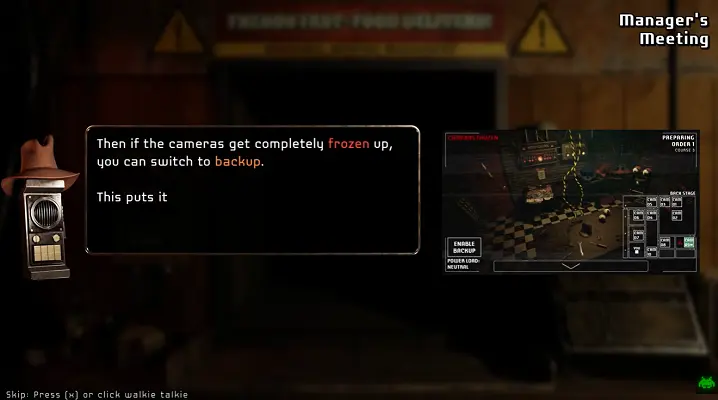
Talkshow Chica adds a sharper reaction test, while Bonnie is better at making the office feel exposed. Later courses add Talkshow Freddy through vent pressure and Talkshow Foxy through camera-system danger. These are not just cosmetic enemies. Their routes change what you should check, which tool matters, and how risky it is to keep working on orders.
Threadbear is the threat that makes the final stretch feel different. He can interfere with the delivery flow, pressure the vent outlet, and attack the camera setup in ways that force you to step away from a comfortable routine. The result is a short game that keeps expanding until the whole restaurant feels connected to your desk.
First-run tips
Start A Bite at Freddy’s by learning one route at a time. Do not treat every sound as the same alarm. The delivery machine, center hall, closet, vent outlet, back stage, and party rooms each tell you something different about where an animatronic is moving. If you know the route, you can respond with less power waste.
Keep an eye on Power Load before it becomes an emergency. The shift is much easier when you understand that a safe-looking action can still make the next thirty seconds harder. A door, fan, lever, or camera response may solve one problem while setting up another. Use the smallest response that clears the immediate threat.
Also remember that orders are part of the danger. This is not only a jumpscare game; it is a management game under stress. If you ignore the food sequence for too long, the shift loses its rhythm and you will be forced to make decisions while several threats are already active.
Browser and mobile notes
Launch the game from the player, click inside the frame if audio or input does not respond, and try full screen before the later courses. If the game shows a black frame, the embedded build may still be loading. Wait a little longer, refresh once, and avoid private browsing if your browser blocks storage or game files.
Desktop is the better way to play because the game uses small visual cues, fast route checks, and several controls close together. A phone can open the page, but the actual game may feel tight on a small screen. Landscape mode and full screen are the most practical mobile options.
Unofficial fan-game note
This is an unofficial browser-play page for A Bite at Freddy’s. The original fan game was developed by Garrett McKay, and Five Nights at Freddy’s belongs to its respective owners. This page exists for quick play, screenshots, video viewing, compatibility notes, and practical guidance for players who want to try the browser build.
This fan game includes horror pressure, animatronic jumpscares, sudden audio cues, and tense resource management. It is best for players who enjoy FNAF-inspired survival games, compact strategy loops, and point-and-click systems where a wrong reaction can make the whole shift collapse.
A Bite at Freddy's Screenshots
A Bite at Freddy's Videos
A Bite at Freddy's FAQ
Can I play it online?
Yes. Press Play on this page to launch the embedded browser build. If the frame stays black, wait for the remote files to load, then refresh once.
What kind of game is it?
It is a fan-made FNAF strategy horror game with point-and-click controls, food-order management, camera checks, and route-based animatronic threats.
Who made it?
The original fan game was developed by Garrett McKay. This page is an unofficial browser-play page and is not an official Five Nights at Freddy's release.
Does it work on mobile?
The page is responsive, but the game is more comfortable on desktop because it expects quick camera checks, small control targets, and precise reaction timing.
Why does the game keep going after I finish an order?
The shift is built around courses and required tasks, not a simple wait-until-morning timer. Keep processing orders and reacting to threats until the current sequence is cleared.